The review, side by side
Open any job to review it. The source is on the left: the scan on a dark background, or the player for a recording. The text is on the right.
- Move between pages with Page Down and Page Up, or the page list.
- Zoom the scan about the pointer, and drag to move it. One key fits the page to the pane’s width again.
- Search the whole document with Ctrl F (⌘ F on a Mac).
- Where the model placed its text on the page (Tesseract, Mistral OCR, LightOnOCR), you can show the regions over the scan and choose one to find its words in the text.
- A title a model wrote as a Markdown heading (Mistral OCR writes “# The Daily Nebraskan”) is
shown in bold without its
#; the text and the files keep the marks as written.
Every shortcut is listed in the Glossary, under Keyboard, written for your system.
Correct the text
Edit the text directly in place, then press Save correction (Ctrl Enter, ⌘ Enter on a Mac), which also marks the page reviewed; Discard changes reverts your edits. Both buttons stay pinned at the foot of the text pane as you scroll, however long the page. Three things follow:
- the model’s own text is kept unchanged underneath, and you can always see it again;
- exports use your corrected text and record that it was corrected;
- anything made later from this text (an analysis, a translation) knows if you corrected the text after it was made, and says so.
A correction not saved is never lost unasked. Turning the page, leaving the review, closing the window or quitting Kalamu first asks whether to discard it: Discard changes goes on, Keep editing stays with your correction. On a Mac the red button only hides the window, so it does not ask; ⌘ Q does.
Mark as reviewed tells Kalamu, and later you, that a page has been checked by a person. A project counts reviewed pages, and its list of what to check is built on it.
Compare models
The fastest way to spot errors is to run two models on the same pages and check only where they disagree. Where two independent readings match, they are usually right; where they differ, at least one is wrong.
- In New job, choose Compare with another model and add a second model (from another provider if you can: their mistakes are less alike).
- In the review, the differences are highlighted. Point at one to see each model’s reading; choose the right one with Use this reading, or type your own.
- Step through the differences from the keyboard, page after page.
With Compare, the other model’s text opens beside yours as Text compared. Right-click in it (or press the menu key) to Copy the words you selected, Copy the whole text compared, and, on a highlighted difference, Use this reading or Show the readings here.
Once you have corrected some pages, Kalamu also shows each model’s error rate against your corrected text, which is an honest basis for choosing the model for the rest of a collection: measured on your documents, not on someone else’s benchmark.
A caution. Two models can share a mistake, especially on a faded word or an unusual name. Agreement lowers the risk; it does not replace reading a sample yourself.
Check an analysis
An analysis is reviewed field by field beside its document. Correct an answer, and for a list of names, rename or remove one from its menu (a click, Enter, or a right click on the name). Each answer comes with the model’s reason, which helps you judge it but is not evidence: go back to the text.
To add a name, a keyword or a theme the model missed, use Add at the end of the list. What you add or rename is underlined as yours, and goes into exports, the dictionary and the search.
In an interview’s analysis, every quotation is the transcript’s own words: Kalamu looks for each one in the text and leaves out those it does not find. To add a quotation the model missed, select the passage in the transcript, right-click and choose Add as a quotation, then the theme it belongs to. It is marked as added by you, in the review and in every export. A very long interview is read in several parts and brought together; if a part could not be read, the review says which minutes are missing and offers Read it again.
Your own regions over a scan
With Show text regions (or Show regions, on a page with none from the model) you can also mark parts of the page yourself, to note what is there or to have it read again. Nothing of this shows until the regions are shown.
- Draw a region, then drag over the page to draw a box. Pressed a second time, it places a box in the middle of the page, which the arrow keys move; Escape cancels.
- Move or resize a box by dragging it, or its corners and sides. From the keyboard, the arrow keys move it, with Shift they resize it, Enter saves.
- Type What is written here if you like, or Remove the region.
- Right-click a region, or press the menu key or Shift+F10 on it, for what its card offers and Copy its text.
- When the card covers what you are reading, drag it up or down by its grip (Move this card) or its empty parts; the arrow keys move it from the grip, and a double click puts it back.
- A box the model drew can be moved or resized too. Its own box is kept, and Put back the model’s box brings it back.
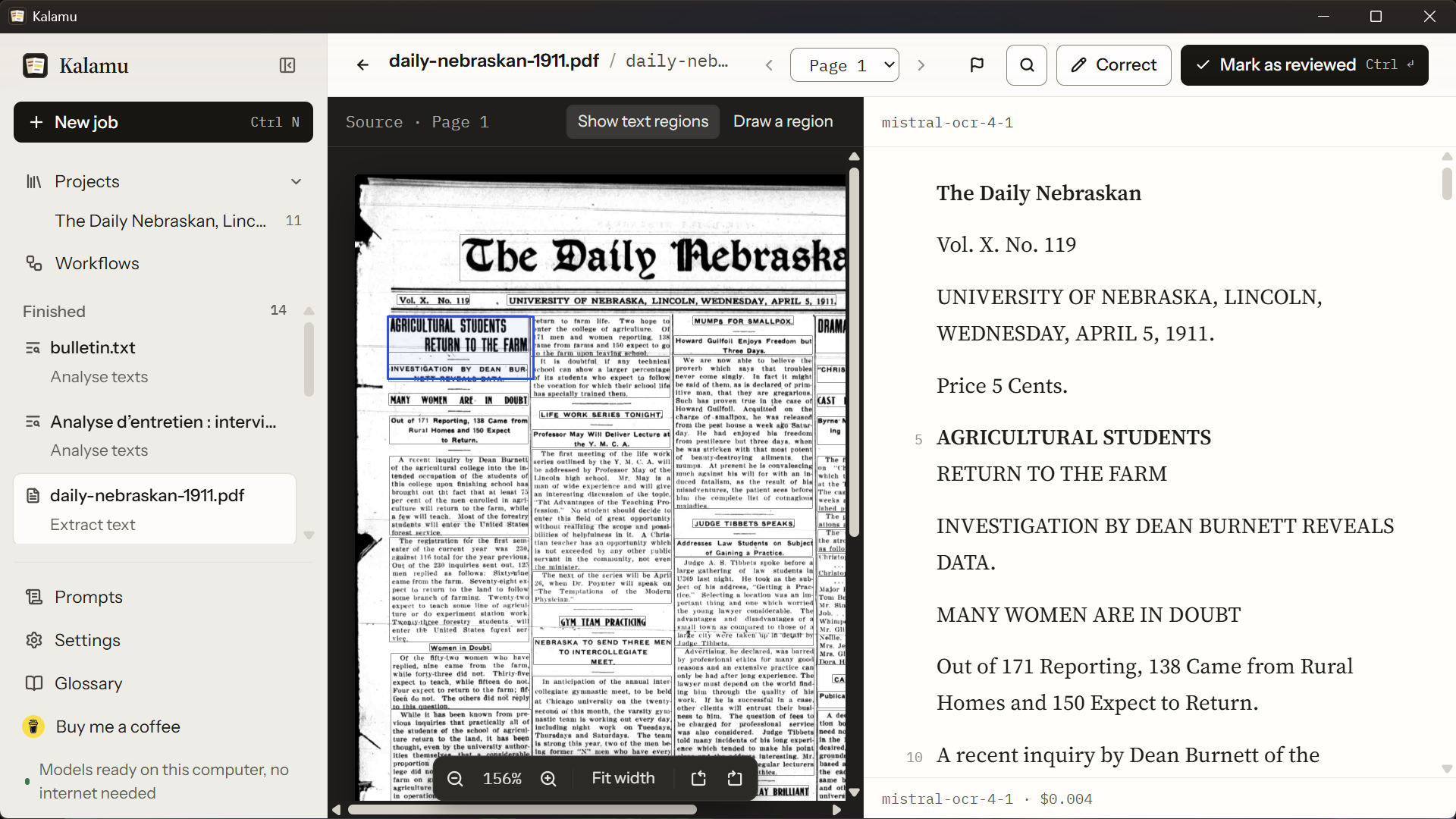 Show text regions: the blocks the model found, outlined, and a region of your own over a headline.
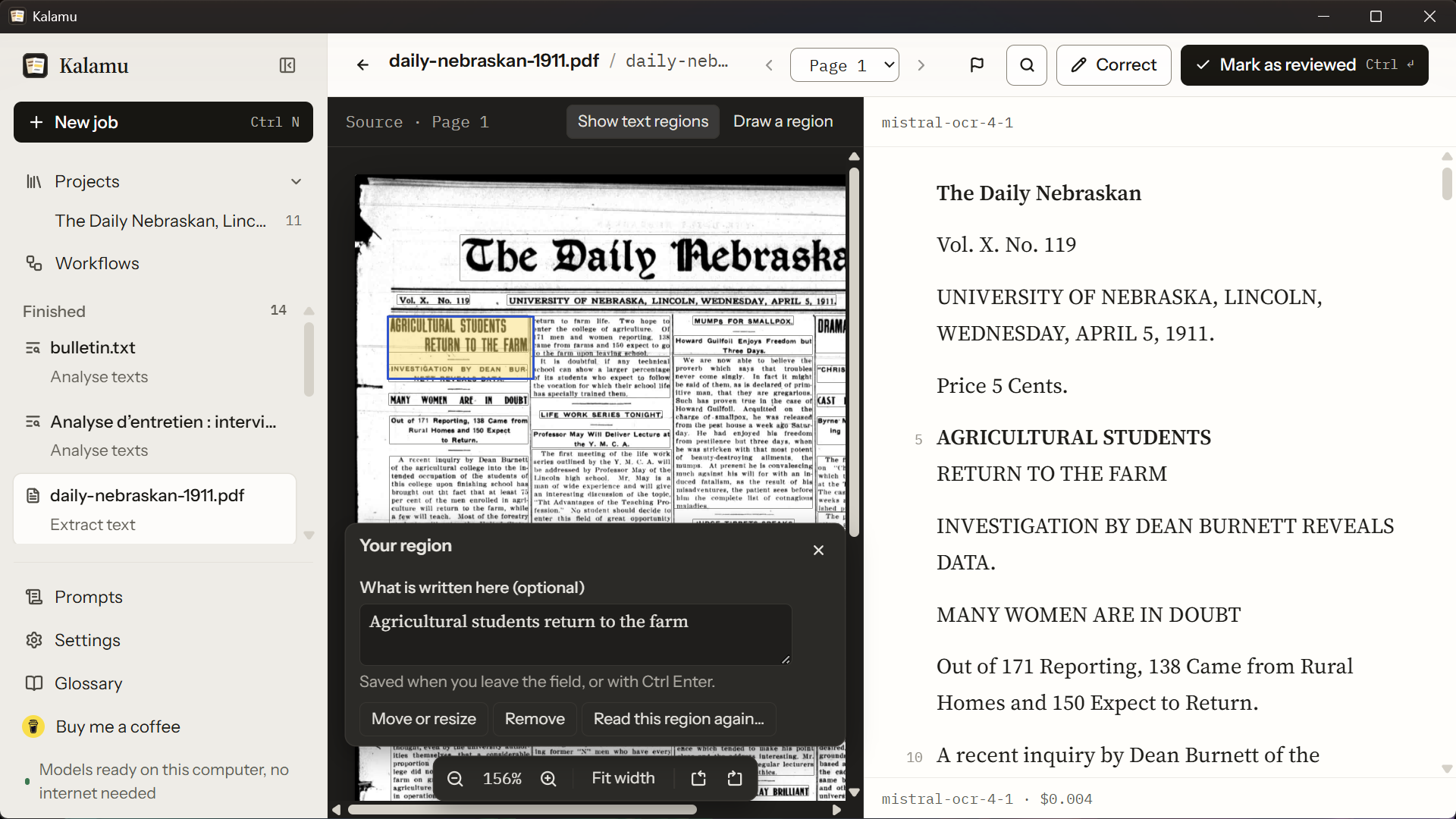 A region of your own, with its card: what is written there, move, remove, or read it again.
Read this region again… cuts that part of the page from the original and sends it alone to the model you choose, as a picture; nothing else of the document is sent. Kalamu says what it should cost first, or that it is free with a model on your computer. The answer is a proposal: Use as this region’s text, Replace these words in the page’s text, Edit first, or Discard. The ALTO, PAGE XML and searchable PDF exports include your regions.
Have a model correct one passage
When a few lines are badly read and the rest is fine, select them in the text and right-click (or use Correct with a model…, which appears with a selection). Choose a model and a correction prompt: Handwritten document or manuscript is offered first for a page read with the handwritten prompt, Printed document or newspaper otherwise. Kalamu says what is sent (the passage and a little of the text around it) and what it should cost. The model’s answer is a proposal shown against your selection: accept it, edit it first, or discard it. Accepting writes it as your correction, which you can undo; nothing changes by itself.
What can go wrong, and how Kalamu tells you
- A page failed (the provider refused it, or the connection dropped): it is marked, and running the job again retries only the failed pages.
- An answer was cut off because it reached the model’s output limit: the page says so. Read fewer pages per call, or use a model with a longer output.
- A model wrote text that is not on the page. Nothing can flag this automatically, which is why the review exists. Small offline models do it more often than the large cloud ones.
- Inappropriate output can be reported from the review.